top of page

Introduction
Welcome to the Owner's Manual page. Below, you will find the basics of how to play the game and how to learn the controls. You may even find some extra helpful hints.
Languages Supported
This game is only available in English and in the United States. We look forward to adding more features in the near future to improve accessibility including localization.
Minimum System Requirements
-
OS: Windows 10 or later.
-
Processor: Intel i5-4590, AMD FX 8350 equivalent or better
-
Memory: 1 GB RAM.
-
Graphics: Nvidia GeForce GTX 970, AMD Radeon R9 290 equivalent or better
-
DirectX: Version 11
-
Storage: 2 GB+ available space.
Updates, Patches, & Bugs
Remember to always keep your computer, drivers, operating system, and Steam app up to date on the latest software. We will be patching any bugs or glitches that may arise following the game's release. If you want to report a bug or a glitch, please contact us by navigating over to the "Contact Us" page or click here. You may also report bugs on the Steam Community Hub or the Official Mr. Sauerkraut Reddit Forum.
Purchasing The Game
This game is only available on Steam for $3.99. Pricing and discounts are subject to change. There are many ways to purchase this game. You may:
1) Navigate to the "Buy" tab on this website.
2) Purchase it directly on the Steam app.
3) Purchase it on the browser version of Steam.
Please click here or the button below to navigate over to Steam's website now:

Getting Started
Once you have downloaded Mr. Sauerkraut, you are ready to play! To get started, launch the Steam app and navigate to your Library to view your list of games. The Library menu option should be located at the top center-left of the Steam app window between where it says "Store" and "Community." Click Home to access the Library home page. A list of all of your Steam games should pop up on a left-side tool bar. Find Mr. Sauerkraut, and double click it. You may also launch the game via a Desktop shortcut.
Loading Screens
Main Menu Options Overview
When the game launches, you should see a series of loading screens including developer titles, logos, and legal disclaimers. Please read these disclaimers carefully and wait for the game to boot.
Once the game is done loading, you will be taken to the game's Main Menu. Here, you will see the following menu options: 1) Story, 2) Audio Settings, 3) Scrolls, 4) Unlockables, 5) Extras, and 6) Quit. The functions of each menu option is as follows:
1) The Start menu option starts the actual game itself.
2) The Options menu option allows you to adjust the game's volume (master, sound effects, and music), toggle windowed/full screen display modes, enable/disable hints, enable/disable fart noises, and select aspect ratio (16:9 or 4:3).
3) The Scrolls menu option allows you to view the scrolls you collect on Story mode.
4) The Unlockables menu option lets you unlock new skins for your Cabbage Cannon. NOTE: to access this menu, you must first collect all four Grummels in story mode.
5) The Extras menu option has a link to this website and may feature additional information such as news, updates, and more.
6) The Quit menu option allows you to quit the game.
Story Mode & Difficulty Selection
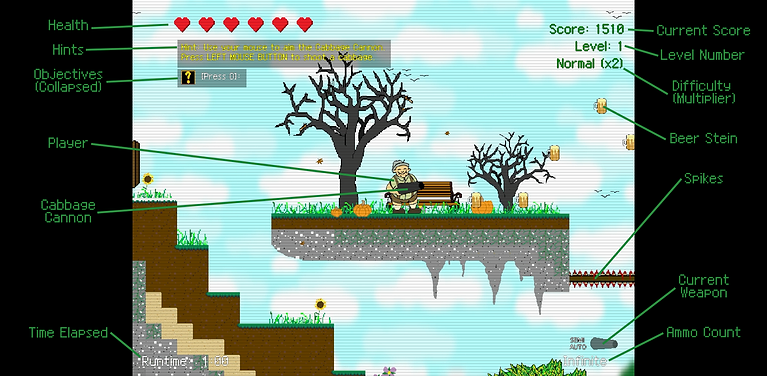
Mr. Sauerkraut Story Mode features four different difficulty levels. The difficulty level determines how much health Mr. Sauerkraut starts with, how much health certain enemies have, and how many points the player scores based on a multiplier. The difficulty levels are as follows:
1) Noob: Player starts with 9 hearts. The score multiplier is x1.
2) Normal: Player starts with 6 hearts. The score multiplier is x2.
3) Hard: Player starts with 3 hearts. The score multiplier is x3.
4) Stupid: Player starts with 1 heart. The score multiplier is x4.
HUD/UI
The in-game heads up display and user interface is as follows:
Scoring
Collect steins to score points. The higher the score, the better! Your high score will be tracked, recorded, then posted on a leaderboard (pending an update). To access the leaderboards, please refer to the Steam app or click here. Scoring a certain number of points will unlock an achievement.
Quests
Complete all quests. Completing a quest rewards Mr. Sauerkraut an extra life plus 1,000 score points. Completing all the quests in one play-through will unlock an achievement.
Scrolls
Collect all 16 scrolls. Each scroll contains either a world-building narrative, proverb, limerick, or poem. You can view all the scrolls you collected and read them again by returning to the Main Menu and navigating to the "Scrolls" page. Collecting all 16 scrolls will also unlock an achievement.
Grummels
Collect all Grummels. Grummels are the small grumpy-looking porcelain figurines hidden around the world. Collect all four to unlock new projectile skins, such as the pretzel, football, laser, and bratwurst. Collecting all the Grummels will unlock an achievement.
Objective Tracker
Controls
You can track objectives in-game to assist you with quests. You can also track the number of Scrolls and Grummels collected.
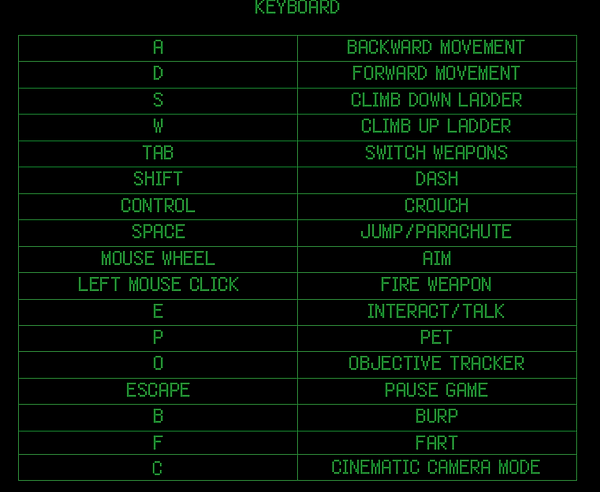
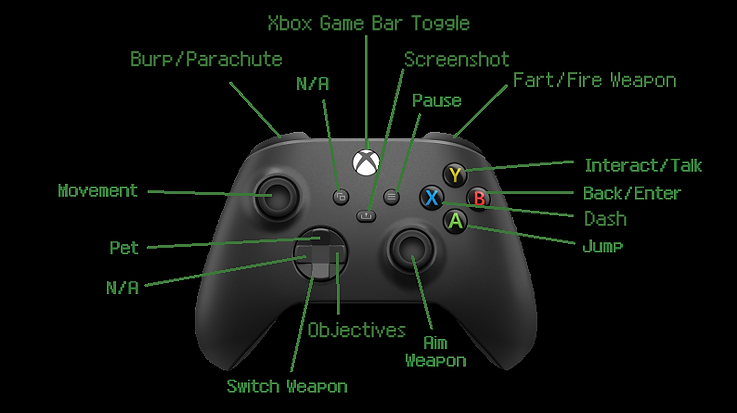
Mr. Sauerkraut can be played using one of two methods: 1) a keyboard and mouse, or 2) an Xbox controller. Please note that remapping the controls is currently unavailable. Full controller support is currently in development. The controls are as follows:
CONTROLLER (XBOX)
bottom of page